
66登録 .xagt
4.00平均評価
6登録エキスパート
25検索カテゴリ
XGenMaker
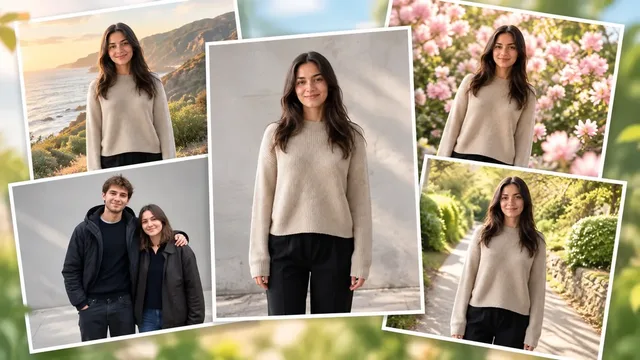
Do you have a photo for SNS but the background doesn't look right? Or do you have wedding snap photos but the background looks outdated? We naturally replace only the background and lighting while keeping the person's face, clothing, and pose exactly as they are, creating a photo of a new scene.
When You Need This
You took a profile photo for SNS but the background is cluttered ·
You want to change the background of wedding snap photos to be more emotional ·
You want multiple photos of the same outfit in different seasons and locations ·
You want to convert indoor shots to an outdoor feel ·
Your travel photo has too many people in the background and you want to clean it up ·
What You Get
Person's face, hair, clothing, pose, and size remain exactly as in the original ·
Background and lighting, color temperature, and shadow direction blend naturally with the person ·
6 options: Seasonal backgrounds (spring/summer/autumn/winter), travel destinations, event venues, couple/wedding snaps, flower background life shots, indoor to outdoor conversion ·
How It Works
Upload your photo ·
Preview 6 background options ·
Choose your desired scene ·
Download the composite image (person area is original, background only replaced) ·
Important Notes
Results are composites and cannot be used for printing or official ID photos ·
Areas where the person overlaps the background (hair ends, hands, etc.) will be adjusted within natural limits ·
Extremely dark photos or photos with small subjects may have lower quality results ·
One photo is processed at a time, but you can try multiple backgrounds with the same photo ·
★0.0(0)
↓ 0
2026年9月9日
XGenMaker
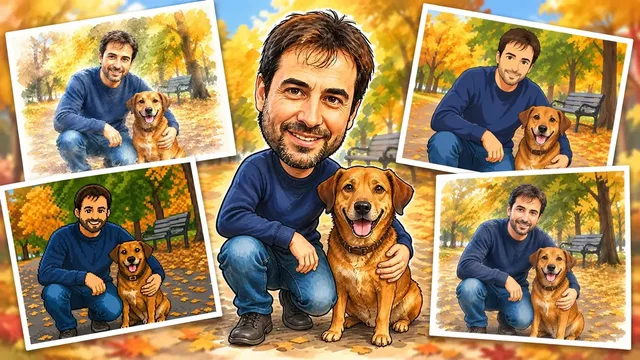
Uploading the same photo repeatedly makes your feed look boring, and commissioning a designer every time costs time and money. This tool transforms one photo into 9 different versions: watercolor, hand-drawn, paper art, felt doll, 3D animation, LEGO, caricature, 2D animation, and pixel poster. Reuse the same moment in various tones.
When You Need This
When you need to post SNS content frequently but have limited shooting opportunities ·
When you want to upload the same photo to multiple channels (Instagram, TikTok, blog) but have each look different ·
When you need to express one image in multiple styles for portfolio or merchandise production ·
When you want to quickly see multiple versions as drafts without design commission costs or time ·
What You Get
9 images with the subject's face, expression, and composition preserved while only material and technique are transformed ·
High-resolution results for each style (suitable for both SNS posting and printing) ·
Consistent tone conversion matching the chosen style (without excessive distortion) ·
How to Use
Upload one photo you want to convert ·
Select desired styles from 9 options (or request full conversion) ·
Review sample images for each style, then execute final conversion ·
Download completed images and use for SNS or print materials ·
Important Notes
If the photo is extremely dark in brightness or color, some styles may have limited detail expression ·
Photos with multiple people can be converted, but more people may result in simpler details ·
Conversion results are AI-generated images; check copyright policies for commercial use ·
Each style operates independently, so you can select only what you want to save time ·
★0.0(0)
↓ 1
2026年9月9日
XGenMaker
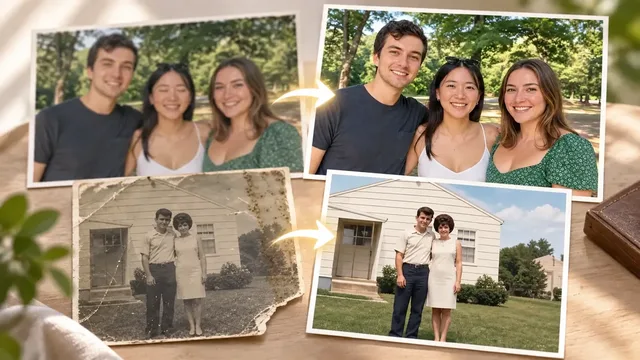
If your wedding day photos turned out blurry from camera shake and too dark to use, professional photo restoration agent Do-Ha is what you need right now. Upload one photo and receive restored results with 8 correction techniques applied as needed: skin retouching, low-quality restoration, background cleanup, angle correction, night photo rescue, color correction, eye-opening recovery, and colorization of old photos.
When You Need This
When you captured an important moment but ruined it with camera shake or low lighting ·
When unwanted people appear in the background or skin tone looks off ·
When you want to digitize old photos or restore their colors ·
When angle or perspective is awkward and you can't reshoot ·
What You Get
Blurry photos restored to sharp, high-resolution images ·
Dark night photos with reduced noise and adjusted brightness ·
Final images with natural skin tones and corrected colors ·
Photos with detailed touch-ups like background cleanup or eye-opening recovery ·
How It Works
Upload one photo that needs correction ·
Do-Ha shows examples of 8 correction techniques and suggests which ones suit your photo ·
Select your desired correction and receive the result with that technique applied ·
Request additional corrections if needed ·
Important Notes
One photo is corrected at a time ·
Extremely damaged or very low-resolution originals may have restoration limits ·
Corrections preserve the original photo's characteristics and don't transform it into something completely different ·
★0.0(0)
↓ 0
2026年9月9日