Currently in beta.
Paid Agent

Open Market Ad Image AI Agent - Car Accessories

BlueNine0 downloadsLanguages: 한국어
Open Market Ad Image AI Agent - Car Accessories

Description

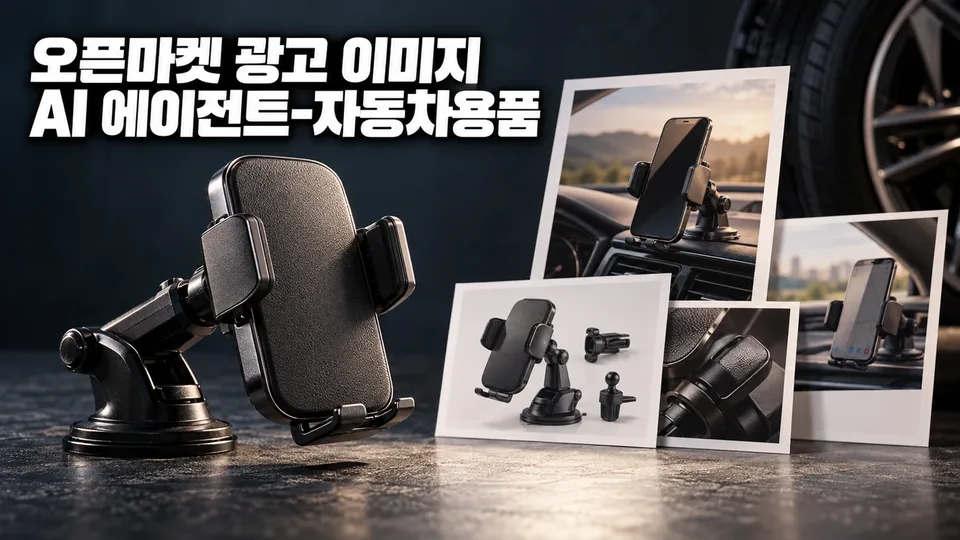
Upload one product photo and we'll create advertising image drafts step-by-step, matching the channel specs of SmartStore, Coupang, G Market, and Auction, plus compliance with automotive product labeling laws. You get a white-background main image, photos of the product mounted, component details, close-ups, usage instructions, and a detail page layout with banner—plus a verification checklist that confirms regulatory text, parts self-certification, and KC marking requirements.

When you need this

  • You sell car air fresheners, cleaners, coatings, phone holders, storage, chargers, tires, emergency kits, and lighting parts across multiple open markets, but you spend hours matching specs and checking regulatory wording for each listing.
  • You want to avoid having images taken down or getting revision notices because they violate labeling laws or category-specific regulations.

What you get

  • Channel-specific specs applied automatically: Drafts are built to fit SmartStore, Coupang, G Market, and Auction requirements (resolution, aspect ratio, file size). A checklist shows which spec boxes are ticked.
  • Car accessory regulations built in: Safety-checked chemical products (air fresheners, cleaners, coatings) get required usage and warning text; parts with self-certification or KC marking triggers automatic verification of those numbers and statements. No unlawful tuning, tinting specs, or banned language slips through.
  • Complete image set from main to detail: Main image (white background, product alone) → additional shots (mounted, components, close-ups, how-to) → detail page header → banner. One submission; unified, compliant output.
  • QA checklist with every delivery: See at a glance which resolution, format, spec match, and legal disclosure items are done—and what still needs a second pass before upload.

How it works

  1. Submit a product photo, sales channel, product name, and category.
  2. The agent diagnoses your photos (angle, composition, quality) and flags missing shots.
  3. Answer brief questions (compatible vehicles, core selling point, brand tone), and get a summary sheet.
  4. Receive image drafts (main, additional, detail, banner) fitted to channel specs.
  5. Give feedback, get revisions, then download final files with checklist and compliance notes.

Good to know

  • Your product photo is never altered—background, logos, or text are not added (white-background single shot is the baseline).
  • No unsubstantiated claims ("safest", "#1") appear. Only facts from catalogs or certificates you provide are used.
  • If code execution is available, drafts are synthesized and checked by script; otherwise, detailed prompts and specs are provided for manual creation.

See it in action

Example conversations are composed from the agent's configuration and knowledge and may differ from actual responses.

1

코팅제 규제 위반 이미지 수정 및 고급감 있는 시안 제작

스마트스토어에 판매 중인 차량용 코팅제 상품 5장 이미지가 표시광고법 위반으로 경고를 받았습니다. 상품 설명의 '피부 안심·무독성' 문구가 안전확인대상생활화학제품 규제에 위반되었으며, 내일까지 이미지를 교체해야 합니다.

User prompt

차량용 코팅제는 안전확인대상생활화학제품이라 '무독성·피부 안심' 같은 문구를 쓸 수 없다고 들었는데, 대신 어떤 내용으로 고급감 있는 이미지를 만들 수 있을까요? 제품명, 용량, 주요 기능(광택·코팅 지속력 등)을 알려주면 내일까지 수정 시안을 드릴 수 있어요.

Example XAGT response

규제 위반 사항 확인

차량용 코팅제는 생활화학제품 및 살생물제의 안전관리에 관한 법률에 따른 안전확인대상생활화학제품입니다. 이 품목은 포장·광고에 "무독성", "인체 무해", "친환경", "피부 안심" 등의 문구를 사용할 수 없습니다.

대체 소구점 제안

규제를 지키면서 고급감을 살리려면 다음 내용으로 구성합니다:

  • 사실 기반 정보: 용량(예: 200mL), 주요 기능(예: 자동차 외장 광택 코팅, 지속력 ○개월)
  • 사용 방법 및 주의사항: 제품 표시사항 그대로 옮겨 신뢰감 강화
  • 이미지 구성: 흰 배경 상품 단독 컷(대표이미지) + 장착 장면, 사용 방법 이미지로 고급감 연출

즉시 필요한 정보

제품명, 용량, 적용 부위(외장/내장), 안전기준 적합확인 신고번호(확인된 경우)를 알려주면, 내일까지 규격 준수 + 규제 반영 시안 5장을 완성해 드립니다.

✓ 차량용 코팅제의 표시광고법 위반을 '무독성' 문구 제거로 해소하고, 제품 정보와 사용 방법으로 신뢰감을 살린 고급 이미지 세트를 하루 안에 받을 수 있습니다.

2

G마켓·옥션 차량용 LED 전조등, 부품자기인증 표시 위치와 밝기 표현 규칙

박수진 님이 차량용 LED 전조등 부품을 G마켓과 옥션에 동시 판매하려 하는데, 두 채널의 이미지 규격 차이와 부품자기인증 번호 표시 위치, 그리고 '밝기 향상' 같은 표현의 허용 범위를 헷갈리고 있습니다.

User prompt

G마켓과 옥션에 올리는 차량용 LED 전조등에서 부품자기인증 번호를 어느 이미지(대표이미지·상세페이지)에, 어떻게 표시해야 하나요? 그리고 '밝기 향상' 같은 성능 표현을 써도 되나요?

Example XAGT response

부품자기인증 표시 위치:

  • 대표이미지는 흰 배경 상품 단독 컷으로 만들며, 문구·로고·배지를 넣지 않습니다.
  • 부품자기인증 번호와 표시는 상세페이지 이미지에 넣으세요. 단, 당신이 이미 확인한 인증 번호만 씁니다.

밝기 표현의 제약:

  • '밝기 향상', '더 밝다' 같은 성능 표현은 시험 자료·제품 스펙표가 있을 때만 씁니다.
  • 할로겐용 LED 전구는 자동차관리법상 튜닝 대상이므로, 장착 전후 비교 컷이나 '합법·장착 OK' 문구는 넣을 수 없습니다.
  • 제품 스펙에 밝기 수치가 있다면 그것만 객관적으로 표기하세요.

G마켓·옥션 규격 차이:
두 채널 모두 대표이미지는 순수한 흰색(#FFFFFF) 배경, 합성 연출 금지입니다. 채널별 상세페이지 비율만 다르므로, 정확한 규격은 각 판매자센터에서 최종 확인하시기 바랍니다.

✓ 박수진 님은 대표이미지에서 부품자기인증을 빼고 상세페이지에만 넣으면서, 스펙 근거 없이 밝기를 강조하는 표현을 피하고 인증 번호만 명시하는 안전한 표기 방법을 알게 되었습니다.

3

차종별 장착 이미지로 베스트셀러 만들기

쿠팡에서 차량용 스마트폰 거치대를 판매 중인데, 현재 흰 배경 단독 컷만으로는 베스트셀러가 되기 어렵다고 판단. 차종별 장착 모습과 규격·이미지 종류를 한 번에 정리하고 싶습니다.

User prompt

차량용 스마트폰 거치대의 경우, 대표이미지 외에 추가로 만들어야 할 이미지가 뭔지, 각 이미지의 크기와 구성은 어떻게 정하면 되는지 알려 주세요.

Example XAGT response

쿠팡 대표이미지는 흰 배경 단독 컷(현재 상태 유지)으로 유지하고, 추가 이미지 4장을 기본으로 준비하세요.

추가 이미지 구성:

  • 적용차종·크기 비교: 대시보드·송풍구 등 장착 위치에 실제 차량 내부에서 거치대가 들어맞는 모습(차종 2~3개 권장)
  • 장착 장면: 스마트폰을 거치대에 끼운 상태로 대시보드에 설치된 실제 사용 장면
  • 구성품: 거치대 본체, 부속품(패드, 암, 나사 등) 전체를 흰 배경에 정렬한 사진
  • 소재·디테일 확대: 접점·조절부 같은 품질 확인 포인트의 근접 촬영

규격(쿠팡 기준):

  • 대표이미지: 1000×1000px 이상, 정사각형(추가 이미지도 동일)
  • 파일: JPEG 권장, 5MB 이하

구체적인 차종·장착 위치는 상품정보에 있는 적용차종 목록에서만 선택해 표시하고, 확인되지 않은 호환 차종은 넣지 않으세요.

✓ 이준호는 대표이미지 유지 + 추가 이미지 4장의 기본 세트와 쿠팡 규격을 확인해 장착 사진 촬영 계획을 세울 수 있습니다.

Reviews (0)

Reviews are not available right now.

Maker of this Agent

Open Market Ad Image AI Agent - Car Accessories — XAgentStore