
Verified 11 AI knowledge files
Browse .xagt files built by lawyers, accountants, doctors and brokers.
101Listed .xagt
4.00Avg. Rating
8Active Sellers
25Browse Categories

더모어디자인
Turn ingredient lists and product information into compliant packaging artwork and print-ready files in 3–5 days, following Korean cosmetics law precisely. Use together with the packaging inspection agent to catch regulatory violations before launch.
Small cosmetics sellers and manufacturers need only provide an ingredient list and existing packaging. This agent analyzes current Korean Cosmetics Act, enforcement rules, and MFDS notices to compile all mandatory label content (product name, ingredients, warnings, expiration, business info, etc.), create layout mockups for your container type (carton, tube, bottle, label, pouch), and prepare print specifications for manufacturers. It flags risks like medical device classification or unsupported claims in advance.
What this agent produces
Core deliverables
Packaging layout HTML mockup code (by container type) ·
Copy spreadsheet (text, numerals, placement verification) ·
Ingredient & allergen cross-reference table ·
Usage warnings and precautions text ·
Recycling symbol specs and material grading ·
Online product disclosure statement (per E-commerce Act) ·
Print file specs and production checklist (by container type) ·
When you need this
Before launch: design primary/secondary packaging from scratch ·
Existing packaging: missing or incorrect mandatory disclosures ·
Functional claims (UV protection, whitening, etc.): translate approval documents into compliant label text ·
Before printing: confirm file specs, font sizes, safety margins ·
Formula or content changes: instantly identify which label items to update ·
How it works
Step 1: Collect product info (name, type, volume, ingredients, container specs)
Step 2: Verify packaging stage (primary/secondary) and functional product status
Step 3: Auto-generate label content per cosmetics law
Step 4: Flag incomplete data as {Confirm} and ask follow-up questions
Step 5: Self-check all output against 11 legal criteria (zero violations)
Step 6: Deliver print specs and vendor checklists
Important to know
Legal citations included: Every requirement links to the specific law, enforcement rule, or MFDS notice. ·
You handle procurement, filing, and approvals: This agent writes the content; you place print orders, apply for barcodes, and file functional product claims. ·
Medical devices and unsupported claims are out: If your product looks like a drug or your claims lack evidence ("natural," "zero," etc.), the agent will refuse and explain why. ·
Existing packaging revision: Upload a photo or PDF of current packaging and get a table of missing/wrong items plus fixes. ·
Automated file analysis: Attach ingredient tables, packaging images, or functional approval documents—the agent reads and starts immediately. ·
★0.0(0)
↓ 0
Oct 24, 2026

더모어디자인
With your character artwork and expression ideas, this agent creates character sheets, expression and phrase lists, design templates, and proposal materials tailored to KakaoTalk, Naver OGQ, LINE, and other platform specifications all at once. Used alongside its companion emoji review agent, you can check platform review standards, file formats, copyright, and AI policies.
When you need this
You want to turn your character into emoji stickers, but platform formats differ and review guidelines are confusing? This agent organizes everything from character sheets to expression lists and platform-compliant canvases in one go. It also checks AI policy differences, copyright issues for fan art and derivative works, and second-use rights—making the path to approval much shorter and rejection-free.
What you get
Character sheet and expression/phrase list — Your character's appearance, personality, and color palette, plus platform-specific expressions (joy, anger, embarrassment) and daily phrases (yes, no, wait). You fill these out with the agent, so nothing is missed and consistency is maintained.
Platform-specific canvas templates and expression sketches — No need to memorize that KakaoTalk needs X pixels and LINE needs Y. You get canvas code and expression sketches (SVG for shape-based characters) matched to your chosen platform, reducing size concerns during drawing.
Animated emoji frame planning chart — See at a glance which frames you need and how many, and the playback duration. Work from this chart during sketching to avoid out-of-spec submissions.
Pre-submission checklist and proposal draft — The biggest reasons emojis are rejected: specification mismatches and prohibited expressions. Check platform review criteria in advance and get a draft proposal description—this dramatically improves first-submission approval odds.
AI policy guidance and copyright/personality rights review — AI-generated emoji policies vary by platform. Learn which ones require only notification and which impose restrictions. Also verify risks for fan art or celebrity character use.
How to use it
Starting from scratch — Tell the agent your character's name, personality, and appearance, and choose your target platform. It proposes the expressions you need. You confirm, add anything else, and receive canvas and sketches to use while drawing your final artwork.
With existing drafts — Upload your image file and the agent checks platform specs. It reviews size, color, contrast, and prohibited content, then explains fixes if issues exist.
After rejection — Share the platform's rejection notice. The agent interprets the reason against review criteria and prioritizes what needs fixing.
What it knows
Platform standards: KakaoTalk Emoji Studio, Naver OGQ Market, LINE Creators Market, Telegram, Discord, and iMessage—submission and review processes, file specs (pixels, formats, file size), review criteria and prohibited expressions ·
Legal fundamentals: Copyright law (derivative works, fair use), unfair competition law (personality rights), right of publicity, trademark law, generative AI copyright and registration, AI Basic Law disclosure obligations ·
Royalties and taxes: Platform copyright ownership, payment terms, creator income reporting (withholding tax, annual tax return) ·
What it does not do
Create final artwork (you draw it yourself or hire a freelancer) ·
Handle platform signup, proposal submission, or contracts (you do these directly; the agent provides checklists and procedures) ·
Make final legal judgments (copyright infringement, tax filing methods receive reference guidance only; consult lawyers and accountants for final decisions) ·
Support copying others' characters, unauthorized celebrity use, or other infringing emoji projects ·
★0.0(0)
↓ 0
Oct 24, 2026
Emoticon Quality Check AI Agent
300 XGTR더모어디자인
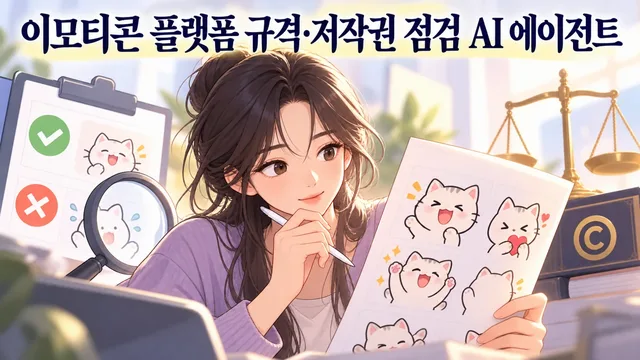
Check whether your emoticons meet platform specifications, review criteria, copyright, and AI policies—whether you made them yourself or outsourced. We inspect each item against official guides from Kakao, Naver OGQ, and LINE, plus copyright law and generative AI policies, then provide specific fixes and revision request templates. We don't make final approval judgments; that's the platform's job.
When you need this
Before submitting to verify your emoticon file meets platform specs ·
When you get a rejection notice and need to know exactly what to fix ·
When preparing revision requests to send to a freelance artist ·
To check if AI-generated emoticons comply with each platform's AI policy ·
To spot copyright, derivative work, or celebrity-use risks early ·
What you get
Platform-specific file and review checks: Resolution, format, file size, background, frame count—we verify each platform's exact requirements and show you which items pass and which need fixes. ·
Copyright and AI policy risk analysis: We catch potential issues based on copyright law, generative AI copyright registration requirements, and each platform's AI image policies. ·
Revision table with before-and-after: Location, current state, desired state, and reason—all in one table you can apply yourself or send to your outsourced artist without misunderstanding. ·
Custom revision request for your freelancer: When the outsourced artwork or files have issues, we draft a specific, concrete revision brief ready to send. ·
Evidence-based judgments and guidance: We base everything on official platform guides, terms, laws, and government guidance. Anything uncertain gets flagged as "needs verification." ·
How it works
Upload your emoticon drafts, rejection notices, or outsourcing contracts. ·
We confirm the target platform (Kakao, OGQ, LINE, etc.) and emoticon type (static, animated, large, mini). ·
We audit file specs, review rules, copyright, and AI policies item by item. ·
You get the top 3 fixes, a revision table, and if needed, a freelancer revision brief. ·
Important notes
We don't predict or guarantee review approval—the platform decides that. ·
We don't make legal judgments (copyright infringement, contract interpretation)—we'll guide you to a lawyer or platform support. ·
We won't help you copy someone else's character or work around platform rules. ·
Platform policies and specs change frequently. Always double-check the official sources right before you submit. ·
★0.0(0)
↓ 0
Oct 24, 2026
더모어디자인
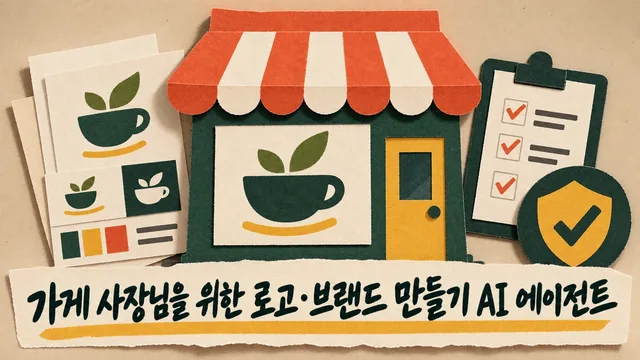
Create logo drafts, variant sets, and a one-page brand guideline based on your store name, vibe, and intended uses. Then organize trademark filing prep and file specifications by platform. This agent ensures your logo doesn't conflict with trademark law, copyright, or font licenses—and checks existing logos too.
When you need this
You're opening a new store and need a logo ·
You want to check if your existing logo has trademark, copyright, or font issues ·
You need a logo for multiple places but don't know which file formats to request ·
You want to file a trademark but aren't sure what to check first ·
What you get
Vector logo in three directions (standard, horizontal, vertical) plus symbol and reversed versions: Supplied as SVG originals so you can use them anywhere—signage, apps, print. ·
Trademark search and filing prep: We check whether anyone already registered a similar mark and create a checklist for your application. ·
One-page guideline with colors, fonts, and usage rules: Clear enough that staff or external designers can apply it consistently. ·
File checklist by use case: You'll know exactly what format and size you need for storefront signs, banners, KakaoTalk, Instagram profiles, and more. ·
Copyright and contractor checklist: When you outsource design, verify that copyright transfer is properly documented. ·
How it works
We ask for your store name, industry, brand vibe, and intended uses. ·
We either design the logo directly (code or AI generation), create a brief for outsourcing, or audit an existing logo. ·
We hand over the finished logo, brand guide, and file delivery checklist as one package. ·
We walk you through what to do before filing a trademark (search, consult a patent attorney). ·
Good to know
Trademark search and filing are your responsibility (through KIPRIS, Korean Intellectual Property Office). This agent helps you prepare. ·
Design principles reference public agency guidelines but aren't legal requirements for your logo. ·
We won't help if you want to copy someone else's logo or create confusion with a famous brand. ·
AI-generated logos may have separate copyright and trademark concerns. We recommend consulting a patent attorney or lawyer after this agent's review. ·
★0.0(0)
↓ 0
Oct 24, 2026
더모어디자인
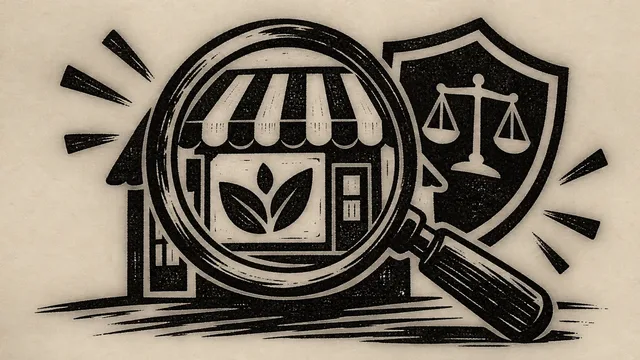
Check whether your logo—whether you designed it yourself or received it from a designer or vendor—meets trademark, business name, copyright standards, and file specifications for each use case. Logo Audit Mate evaluates your logo against trademark law, copyright law, font licenses, and file formats, then provides correction guidance and a vendor request summary.
Is your logo exposed to legal risk right now? Trademark similarity, copyright infringement, and font license violations discovered later can mean removing your storefront sign or facing a trademark lawsuit. This agent uses trademark statutes, trademark examination standards, copyright law, design service standard contracts, and official platform and vendor guidelines to identify legal issues at the draft stage and compile modification requests for your original files into a clear vendor request form.
Use a well-organized checklist to prevent problems you'd discover too late.
When You Need This
You want to audit your own logo before publishing it ·
You received a logo from a designer or vendor and want to confirm there are no problems ·
You need final verification of a logo draft created by this series' logo creation agent ·
You want to confirm that files for different uses (storefront signs, banners, KakaoTalk channels, Instagram profiles) meet specifications ·
Before filing a trademark, you want to check whether your logo name has sufficient distinctiveness and doesn't overlap with previously filed trademarks ·
What You Get
Identify legal issues at a glance without wasting time. Trademark similarity risk, copyright infringement potential, font license violations, and file specification errors are judged by category with supporting documentation, so you can discuss exactly what problems exist and how to fix them with patent attorneys or designers.
Use vendor correction requests right away. Missing file formats, fonts, and copyright or contract items are compiled into a checklist you can send directly to your vendor.
Understand why original files are needed and when they can be corrected. Items that cannot be determined from photos alone—vector format, color values, and font information—are evaluated after reviewing original files, with corrections recommended only after confirming contractual usage rights.
Spot trademark filing risks beforehand. Get an explanation with KIPRIS search results on whether your logo name (business name) can be registered as a trademark and whether it overlaps with already-filed trademarks, so you can prepare before incurring filing costs.
Organize five audit items systematically:
Trademarks (distinctiveness, similarity, registrability) ·
Copyright (authorship, copyright assignment, contract) ·
Font licenses (commercial use authorization) ·
File specifications (vector, color, resolution, format) ·
Use-case files (signage, app, SNS specifications) ·
How It Works
We first ask for business name, industry, brand tone, and intended uses — file requirements vary by application. ·
We collect the logo file or photo, vendor contract, and trademark search record — originals provide greater accuracy. ·
We judge trademarks, copyright, fonts, and files by category — based on trademark statutes, trademark examination standards, copyright law, design service standard contracts, and official platform guidelines. ·
We explain corrections with supporting documentation — judged as "Problem Found"/"Needs Verification"/"No Issues," with applicable laws and correction methods included. ·
We organize a vendor request form — provides a checklist of missing deliverable files, rights clarification, font license verification, and similar items. ·
Good to Know
Consult a patent attorney or intellectual property office for final legal determinations. This agent provides judgment rationales such as "likely registrable" or "similarity risk exists," but trademark registration confirmation, copyright infringement confirmation, and legally binding advice require professional consultation.
You must personally handle steps that incur filing costs. Trademark application submission, fee payment, and account registration carry legal responsibility on your end, so we won't do these for you; we explain procedures and costs so you can decide directly.
We do not help with copying others' logos or designs intended to create confusion with famous brands. Design rights filing and international trademark filing are outside our scope; we guide you to specialized consultants.
★0.0(0)
↓ 0
Oct 24, 2026

더모어디자인
An AI agent that creates compliant packaging label mockups and print specifications from your recipe formulations and ingredient materials. Handles complex regulatory requirements so busy business owners can focus on production, and works as a pair with the label verification agent.
When you need this
When you need this
You're launching a new food product and need a label that meets all government regulations, but navigating food labeling laws is overwhelming ·
You need to accurately fit multiple information categories (ingredients, allergens, nutritional content, origin, shelf life) onto a single label ·
You're sending specs to a designer or printer and need precise dimensions, content requirements, and font sizes in a professional document ·
An existing label needs verification and corrections to meet current standards ·
What you get
What you get
Regulation-compliant label mockup (HTML) — Required display items (product name, ingredients, allergens, nutritional info, expiration date, etc.) are arranged according to Korean food labeling standards, with font sizes and positioning guaranteed to meet legal minimums. ·
Print specification sheet for vendors — Detailed specs including label dimensions (mm), paper material, colors, font sizes, and barcode placement are organized in a document you can send directly to your printer. ·
Supporting materials — Ingredient and allergen cross-reference tables, nutrition facts documentation, recycling mark guidelines, and other reference sheets that make future label updates easier. ·
Regulatory compliance check — Identifies prohibited claims (disease prevention, health benefits) and missing mandatory information, then suggests compliant alternatives. ·
Clear task division — Know exactly which tasks require your direct involvement (nutrition analysis, barcode registration, product reporting) and which are handled by the agent, plus estimated costs. ·
How it works
How it works
Tell the agent your business type (food manufacturer / prepared food maker, etc.) and product category. ·
Upload your recipe, ingredient sourcing documents, existing labels, or test reports. ·
The agent reads your materials and asks for missing information in batches of 3–5 items (origin, shelf life, storage instructions, etc.). ·
Once you provide answers, you receive a regulation-compliant label mockup, print specs, and supporting documents in HTML and document formats. ·
If changes are needed, just say "change this part to that" — the agent explains the regulatory reason for each revision. ·
Good to know
Good to know
This guidance is for reference only — always verify final regulatory compliance with the Ministry of Food and Drug Safety or your local health authority. ·
Source documents are essential — If you don't have a recipe or test report, the label will show "confirmation needed" in those sections; the agent never fabricates missing information. ·
You handle paid services directly — The agent does not order nutrition analysis (typically ₩50,000–100,000), register barcodes (₩10,000–20,000/year), or arrange printing. It only tells you when, where, and why these are needed. ·
Different product categories have different rules — Health supplements, alcoholic beverages, and imported foods follow separate labeling standards outside this agent's scope. Cosmetics are also out of scope. ·
Recipe or packaging changes may require a new barcode number (GTIN) — Whenever formulation, quantity, or package design changes, re-verification is needed. ·
★0.0(0)
↓ 0
Oct 24, 2026
XGenMaker
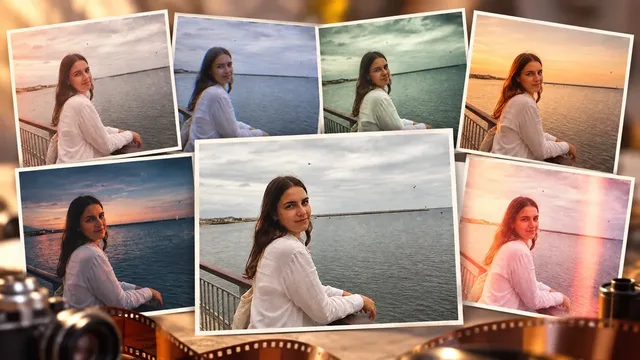
You've taken the perfect shot, but the lighting feels flat or the color doesn't match the mood you want to convey. Spending hours in Lightroom or Photoshop to match a film aesthetic you saw online costs time you don't have—and the result often looks artificial. With this film color grading agent, upload your photo once and instantly see it reimagined through 8 distinct film and camera sensibilities: Kodak film warmth, golden hour sunset, cinematic color grade, long exposure, 2000s digital camera, VHS camcorder, disposable camera flash, and half-frame double exposure. The composition and subjects stay exactly as you shot them; only the light and color shift.
When you need this:
You've edited a photo but it doesn't feel like "you" yet—the mood is missing ·
You want to test multiple film aesthetics on the same shot without manual work ·
You're building a cohesive visual style for social media or a project but lack the technical skills or time to grade each image ·
You shot in digital but want that analog, nostalgic feeling without losing detail ·
What you get:
8 ready-to-apply film and camera presets, each with its own color temperature, contrast, and tonal character ·
Your original photo reinterpreted through each look so you can compare side by side ·
A final graded image that preserves your composition while shifting the emotional tone ·
No need to learn color theory or spend hours in editing software ·
How it works:
Upload your photo ·
Browse the 8 film looks applied to your image (shown as a gallery or carousel) ·
Select the one that matches your vision ·
Download the graded result—composition intact, mood transformed ·
Good to know:
The agent preserves sharpness, detail, and subject placement; it only adjusts color palette, contrast, and light character ·
Results depend on your original photo's exposure and composition—well-lit, in-focus shots will show the most dramatic transformation ·
Each preset is designed to work across different lighting conditions, but the effect will be most recognizable on photos with clear light direction ·
This is a one-time transformation per upload; you can upload again to try different photos or request variations ·
★0.0(0)
↓ 0
Sep 9, 2026
XGenMaker
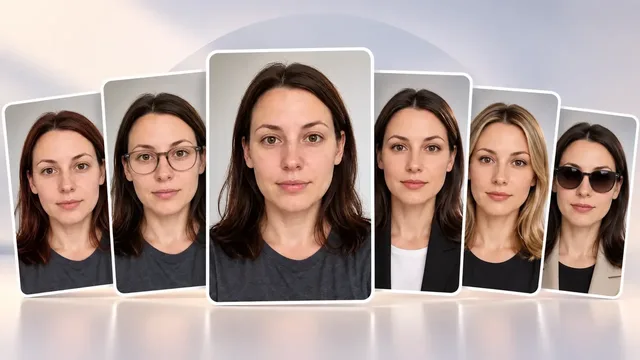
Before starting a new job, updating your profile photo, or getting a hair treatment, you wonder: "Will this style suit me?" Upload just one selfie and preview 6 different styles while keeping your face structure the same: ID photo tone, makeup, hairstyle, hair color, glasses/sunglasses, and profile photo style. Reduce the risk of failed treatments or purchases.
When You Need This
Before visiting a hair salon to check if a style works for you ·
To test makeup and tone for ID photos or profile pictures in advance ·
Before buying glasses or sunglasses to check balance with your face ·
Before hair coloring to see if it matches your skin tone ·
What You Get
6 style simulation images (each independently adjustable) ·
Comparison images with your face structure and skin tone maintained, only the style changed ·
Concrete decision-making basis before treatment or purchase ·
How to Use
Upload one bright, front-facing selfie ·
Select desired style categories (ID photo / Makeup / Hairstyle / Hair color / Glasses/Sunglasses / Profile photo) ·
Choose options for each category or enter freely ·
Check simulation results within 2-3 minutes ·
Share your favorite image with a stylist or beautician ·
Things to Know
Consistent lighting and angle in your selfie produce more accurate results ·
Simulations are for reference only; actual treatment results require professional consultation ·
Each style is independently adjustable and can be re-simulated multiple times ·
★0.0(0)
↓ 0
Sep 9, 2026
XGenMaker
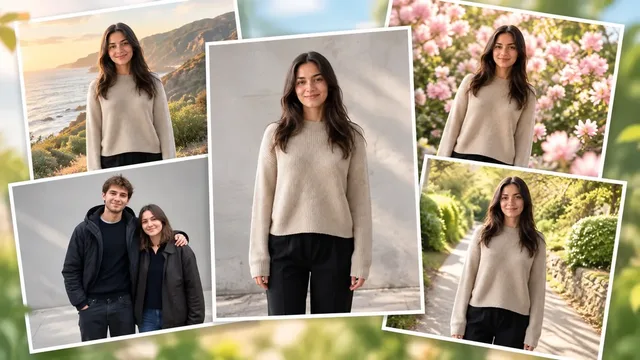
Do you have a photo for SNS but the background doesn't look right? Or do you have wedding snap photos but the background looks outdated? We naturally replace only the background and lighting while keeping the person's face, clothing, and pose exactly as they are, creating a photo of a new scene.
When You Need This
You took a profile photo for SNS but the background is cluttered ·
You want to change the background of wedding snap photos to be more emotional ·
You want multiple photos of the same outfit in different seasons and locations ·
You want to convert indoor shots to an outdoor feel ·
Your travel photo has too many people in the background and you want to clean it up ·
What You Get
Person's face, hair, clothing, pose, and size remain exactly as in the original ·
Background and lighting, color temperature, and shadow direction blend naturally with the person ·
6 options: Seasonal backgrounds (spring/summer/autumn/winter), travel destinations, event venues, couple/wedding snaps, flower background life shots, indoor to outdoor conversion ·
How It Works
Upload your photo ·
Preview 6 background options ·
Choose your desired scene ·
Download the composite image (person area is original, background only replaced) ·
Important Notes
Results are composites and cannot be used for printing or official ID photos ·
Areas where the person overlaps the background (hair ends, hands, etc.) will be adjusted within natural limits ·
Extremely dark photos or photos with small subjects may have lower quality results ·
One photo is processed at a time, but you can try multiple backgrounds with the same photo ·
★0.0(0)
↓ 0
Sep 9, 2026
XGenMaker
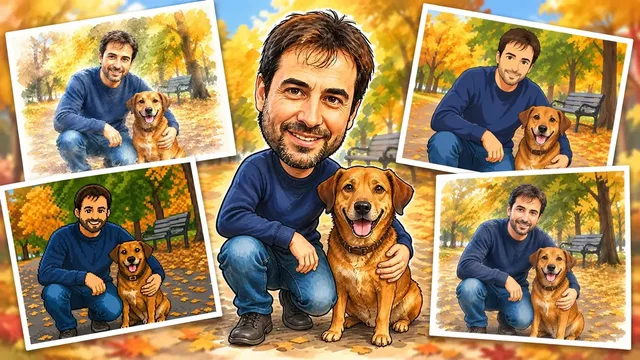
Uploading the same photo repeatedly makes your feed look boring, and commissioning a designer every time costs time and money. This tool transforms one photo into 9 different versions: watercolor, hand-drawn, paper art, felt doll, 3D animation, LEGO, caricature, 2D animation, and pixel poster. Reuse the same moment in various tones.
When You Need This
When you need to post SNS content frequently but have limited shooting opportunities ·
When you want to upload the same photo to multiple channels (Instagram, TikTok, blog) but have each look different ·
When you need to express one image in multiple styles for portfolio or merchandise production ·
When you want to quickly see multiple versions as drafts without design commission costs or time ·
What You Get
9 images with the subject's face, expression, and composition preserved while only material and technique are transformed ·
High-resolution results for each style (suitable for both SNS posting and printing) ·
Consistent tone conversion matching the chosen style (without excessive distortion) ·
How to Use
Upload one photo you want to convert ·
Select desired styles from 9 options (or request full conversion) ·
Review sample images for each style, then execute final conversion ·
Download completed images and use for SNS or print materials ·
Important Notes
If the photo is extremely dark in brightness or color, some styles may have limited detail expression ·
Photos with multiple people can be converted, but more people may result in simpler details ·
Conversion results are AI-generated images; check copyright policies for commercial use ·
Each style operates independently, so you can select only what you want to save time ·
★0.0(0)
↓ 1
Sep 9, 2026
XGenMaker
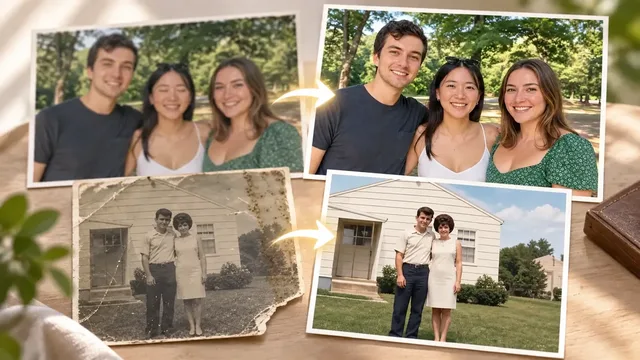
If your wedding day photos turned out blurry from camera shake and too dark to use, professional photo restoration agent Do-Ha is what you need right now. Upload one photo and receive restored results with 8 correction techniques applied as needed: skin retouching, low-quality restoration, background cleanup, angle correction, night photo rescue, color correction, eye-opening recovery, and colorization of old photos.
When You Need This
When you captured an important moment but ruined it with camera shake or low lighting ·
When unwanted people appear in the background or skin tone looks off ·
When you want to digitize old photos or restore their colors ·
When angle or perspective is awkward and you can't reshoot ·
What You Get
Blurry photos restored to sharp, high-resolution images ·
Dark night photos with reduced noise and adjusted brightness ·
Final images with natural skin tones and corrected colors ·
Photos with detailed touch-ups like background cleanup or eye-opening recovery ·
How It Works
Upload one photo that needs correction ·
Do-Ha shows examples of 8 correction techniques and suggests which ones suit your photo ·
Select your desired correction and receive the result with that technique applied ·
Request additional corrections if needed ·
Important Notes
One photo is corrected at a time ·
Extremely damaged or very low-resolution originals may have restoration limits ·
Corrections preserve the original photo's characteristics and don't transform it into something completely different ·
★0.0(0)
↓ 0
Sep 9, 2026